
An FNSKU label is a black-on-white Amazon barcode, usually 1 x 2.625 inches, printed at 300 DPI or higher on a laser or thermal printer and placed flat on each unit. Since March 31, 2026, most sellers who are not brand owners need one on every FBA unit, even when the product already has a UPC. This guide covers who needs it, the size and print specs and where to put the label. Amazon updates these rules, so confirm anything critical in Seller Central.
Who needs an FNSKU label in 2026
Amazon ended stickerless commingled inventory for units shipped on or after March 31, 2026. That changed who can rely on the barcode printed on the package.
| Seller situation | Barcode to use |
|---|---|
| Reseller, not enrolled as a brand owner | Amazon FNSKU label on every unit, even if a UPC is printed on the package |
| Brand owner with the Brand Representative role in Brand Registry | Can usually use a valid manufacturer barcode, or choose an FNSKU |
| Product with no valid manufacturer barcode | Amazon FNSKU label |
Your barcode preference is set in your FBA settings in Seller Central, and it applies to new offers you create after you change it. Check your account settings before you print packaging.
FNSKU vs UPC
| UPC or other manufacturer barcode | FNSKU | |
|---|---|---|
| Issued by | GS1 or your barcode provider | Amazon |
| Identifies | The product, across stores | Your specific inventory inside Amazon |
| Works on other retailers | Yes | No, it is Amazon only |
| Needed for | Creating and matching your listing | Tracking your units in FBA |
Label size and print specs
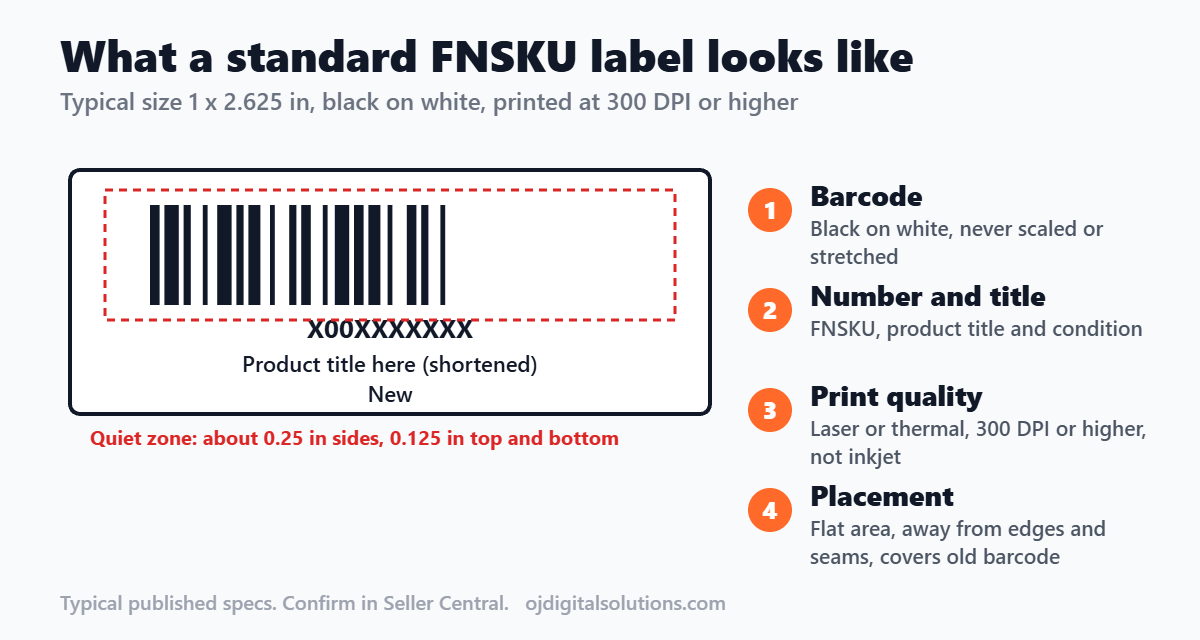
These are the commonly published specs. Your printer, label stock and Seller Central screen are the final word.
| Item | Typical requirement |
|---|---|
| Label size | 1 x 2 inches up to 2 x 3 inches |
| Common size | 1 x 2.625 inches (30 labels per US Letter sheet) |
| Color | Black barcode on a white, non-reflective label |
| Printer | Laser or thermal printer at 300 DPI or higher, not inkjet |
| Quiet zone | About 0.25 inch on the sides and 0.125 inch on top and bottom |
| Content | Scannable barcode, FNSKU number, product title and condition |
| Scale | Print at 100%, never shrink or stretch the barcode |
Where to place the label
- Put it on a flat, smooth area of the unit or its packaging.
- Keep it away from edges, corners, seams and curves so it scans in one pass.
- Cover any other barcode on the package so only the FNSKU can scan.
- Do not cover serial-number or other labels that must stay visible.
- For poly-bagged items, place the label on the bag so it lies flat. See our FBA packaging requirements for bag rules.
How to print FNSKU labels
- In Seller Central, open your inventory or the Send to Amazon workflow.
- Select your product and choose the option to print item labels.
- Pick the label size that matches your sheet or thermal stock.
- Print at 100% scale, then scan a test label with your phone.
- Apply the label before you pack the box.
Common FNSKU mistakes
- Printing on an inkjet printer, so the bars smudge
- Scaling the barcode in the print dialog
- Mixing up FNSKUs between variations of the same product
- Leaving the old barcode visible next to the new one
- Placing the label across a fold, seam or curve
- Printing the barcode into package artwork without checking it against Amazon’s rules
Designing packaging with a barcode area
If you print packaging, leave a clean, flat white area where the label will go, so a sticker covers nothing important. Sellers who want an FNSKU printed directly on the package need to follow the current rules in Seller Central. For help with packaging artwork, see our label design guide, our packaging design cost guide and our listing checklist. For done-for-you design, visit our services page.
Frequently asked questions
What is an FNSKU?
An FNSKU is a barcode Amazon assigns to each of your products in FBA. It lets Amazon track your specific units inside its warehouses, separate from other sellers.
Do I need an FNSKU label on every unit?
Since March 31, 2026, sellers who are not brand owners generally need an FNSKU on every unit, even if the product has a UPC. Brand owners with the Brand Representative role in Brand Registry can usually use the manufacturer barcode instead. Check Seller Central for your own account.
Can I print the FNSKU on my product package?
Many sellers do this to avoid stickers, but the printed barcode must meet Amazon’s scanning rules and match the correct product. Confirm the current rules in Seller Central before you send artwork to print.
What size is an FNSKU label?
Amazon’s accepted sizes run from about 1 x 2 inches to 2 x 3 inches. A very common choice is 1 x 2.625 inches, which fits standard 30-up label sheets.
Can I print FNSKU labels on an inkjet printer?
Laser and thermal printers are recommended at 300 DPI or higher. Inkjet ink can smudge and make the barcode hard to scan.
What should I do with the manufacturer barcode already on the package?
When you use an FNSKU, the label should cover the old barcode so only one barcode can scan. Do not cover serial-number or other special labels that Amazon requires you to keep visible.
Bottom line
Decide your barcode type first, then print clean labels at the right size and place them flat. A scannable barcode keeps your shipment moving, and a bad one can cause receiving delays. Confirm your account’s current rules before you ship.