


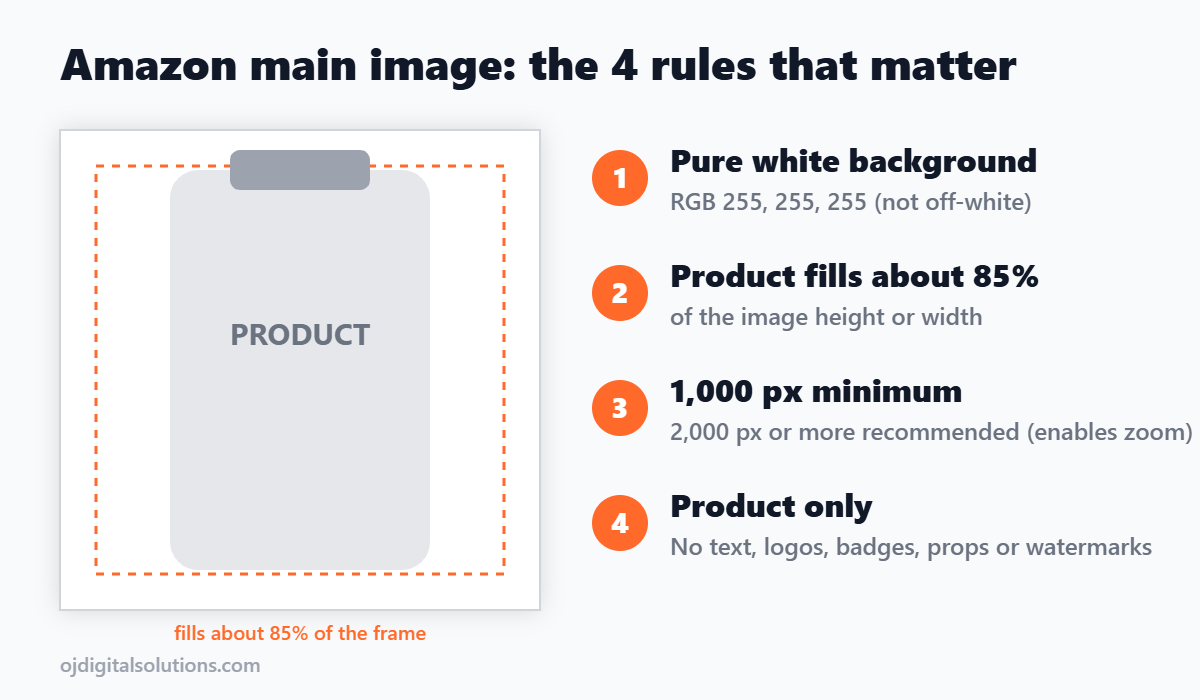
Quick answer: Your Amazon main image must show only the product on a pure white background (RGB 255, 255, 255), fill at least 85% of the frame, and be at least 1,000 pixels on the longest side. It can’t have text, logos, badges, watermarks, props or extra items. Break one of those rules and Amazon can suppress your listing from search.
Last updated: November 2026. Category rules can differ, so always check the style guide for your category in Seller Central.
Amazon main image requirements at a glance
| Requirement | What Amazon expects |
|---|---|
| Background | Pure white, RGB 255, 255, 255 |
| Product size in frame | At least 85% of the image |
| Minimum size | 1,000 pixels on the longest side (this enables zoom) |
| Recommended size | 2,000 pixels or more on the longest side |
| File format | JPEG, PNG, GIF or TIFF (JPEG is the safe default) |
| What can be in the image | Only the product being sold, shown in full |
| What is not allowed | Text, logos, borders, watermarks, badges, props, extra items, illustrations |
Why the main image matters so much
The main image is what shoppers see in search results before they see anything else. It is the thumbnail that has to earn the click, so Amazon polices it more strictly than any other image on the listing. A clean, sharp main image that fills the frame looks bigger and more trustworthy next to competitors, and it keeps your listing visible.
The rules in detail
1. Pure white background
Amazon asks for RGB 255, 255, 255. Studio photos almost always need editing to get there, because shadows and color casts push the corners and edges to something like 250 or 253. Those shades look white to you, but an automated check can read them as a non-white background.
2. The product fills 85% of the frame
Crop in until the product takes up at least 85% of the canvas. Too much padding makes the product look small in the search thumbnail. Keep the whole product in view, though, since a cropped product is a different problem.
3. Size and sharpness
1,000 pixels is the floor, and below it zoom may not work. Shoot or export at 2,000 pixels or more, keep the product in focus, and keep the edges clean and smooth. Blurry or pixelated images are a common reason for rejection.
4. Nothing but the product
No text, logos, watermarks, badges or inset graphics. No props, no model unless your category allows one, and no extra accessories that you are not selling. If it comes in the box, you can show it. If it does not, leave it out.
What gets a main image rejected or a listing suppressed
- Text, a logo or a badge on the image. This is one of the most common causes.
- An off-white or tinted background. Studio shadows and color casts are the usual culprit.
- A lifestyle scene or props in the main slot. Those go in secondary images.
- Too much empty space. The product should fill at least 85% of the frame.
- A file under 1,000 pixels. It may fail, and zoom won’t work.
- Extra items that are not included. Showing accessories you do not sell can mislead shoppers.
- An AI-generated lifestyle scene behind the product. Reports from sellers and tools say these get listings suppressed, and they cause returns when the image does not match what arrives.
When a listing is suppressed, it can disappear from search, which means no impressions and no sales. Seller Central’s Listing Quality tab usually tells you which rule was broken.
How to fix a suppressed main image
- Open the Listing Quality tab in Seller Central and read the exact reason Amazon gives.
- Check the background with a color picker. Every edge and corner should read 255, 255, 255.
- Remove any text, badges or logos from the main image, and move them to a secondary image.
- Re-crop the product so it fills at least 85% of the frame, then confirm the whole product is visible.
- Export a fresh file at 2,000 pixels or more, and upload it as a new file rather than the same one again.
- Wait for Amazon to re-check the listing, then confirm it is back in search.
Secondary images: where the selling happens
Once the main image is compliant, your other images do the persuading. Rules are looser, so you can use lifestyle scenes, text, infographics and comparisons. A strong stack usually covers these:
| Image slot | What to show |
|---|---|
| Image 2 | Product from another angle, or the product with everything included |
| Image 3 | Key benefits as an infographic, with short text |
| Image 4 | Product in use (lifestyle) |
| Image 5 | Size and dimensions, so shoppers know what they are getting |
| Image 6 | Comparison, or what is in the box |
| Image 7 | Social proof, certifications or a how-to |
Need help building a full image stack? Our team designs Amazon listing images, infographics and A+ content for brands. See our Amazon listing design services. If you are choosing tools for the rest of your listing work, see our guides to Amazon seller tools and Amazon analytics tools.
Quick checklist before you upload
- Background reads 255, 255, 255 at every edge and corner
- Product fills at least 85% of the frame
- Image is 2,000 pixels or more on the longest side
- No text, logos, badges, borders or watermarks
- No props or items that are not included
- Whole product is visible, sharp and in focus
- File saved as JPEG or PNG
Frequently asked questions
What size should an Amazon main image be?
At least 1,000 pixels on the longest side, which is the minimum that turns on zoom. Aim for 2,000 pixels or more, because shoppers who can zoom are more likely to buy.
Does the Amazon main image have to be pure white?
Yes. The background must be pure white, RGB 255, 255, 255. Off-white or light gray can look identical to your eye but can still fail Amazon’s automated check.
Can I put text, a logo or a badge on the main image?
No. The main image can’t have text, logos, borders, watermarks or badges such as “Best Seller” or “Made in USA”. Put those on your secondary images and A+ content instead.
How much of the frame should the product fill?
At least 85%. If there is too much empty white space around the product, it looks small in search results and can be flagged.
Can I use props or a lifestyle scene in the main image?
No. The main image should show only the product being sold. Lifestyle scenes, props and extra items belong in the secondary images.
Why was my listing suppressed for the main image?
The most common causes are a background that is not pure white, text or logos on the image, props or extra items, and a file under 1,000 pixels. Seller Central’s Listing Quality tab usually names the rule that was broken, so fix that and upload a new export of the image.
How many images can I upload to an Amazon listing?
Many categories allow a main image plus several more, commonly up to seven in total, along with a video. Limits vary by category, so check your category’s style guide in Seller Central.
Bottom line
Keep the main image simple: the product, alone, on pure white, filling at least 85% of the frame, at 2,000 pixels or more. Save the selling for the secondary images and A+ content.